Descript and Riverside are the two tools most podcast teams end up choosing between. Both record remote guests, both transcribe, and both let you edit by editing text. But they're built around different jobs: Descript is an editor that also records, and Riverside is a recording studio that also edits.
This comparison is for podcast producers, editors and agencies. It covers recording, editing, transcription, client review, exporting to your DAW, and pricing. Every detail comes from Descript's and Riverside's own pricing and help pages, checked in October 2026. Plans change often, so check their sites before you buy.
The short answer
Choose Riverside if recording is the hard part: large panels, guests on weak connections, or transcripts in many languages.
Choose Descript if editing is the hard part: text-based editing with AI clean-up, transcript exports in many formats, and handing a timeline to Premiere, Audition, Reaper or Pro Tools without paying for a business plan.
Descript vs Riverside at a glance (October 2026)
Recording remote guests
Both record each participant locally on their own device, so a guest's shaky internet doesn't ruin their track.
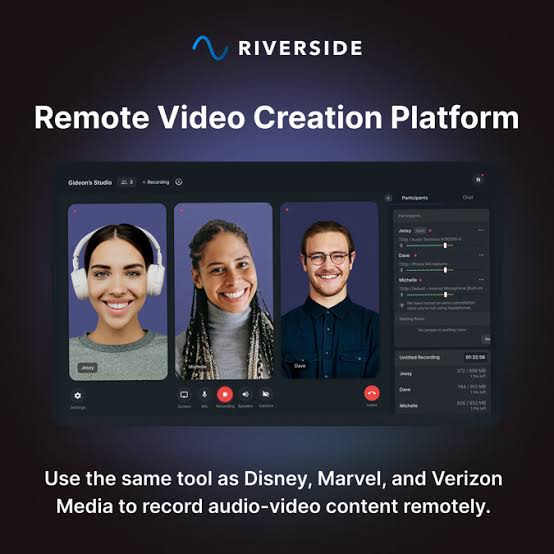
Riverside: a studio session can record up to 100 participants, with up to 9 on screen. Paid plans record up to 4K video and 48 kHz audio. The free plan is capped at 720p and 44.1 kHz. Recording itself is unlimited; the plan limits apply to how many hours of separate high-quality tracks you can download.
Descript: remote recording happens in Rooms, which records up to 10 participants on every plan. Audio is 48 kHz, with an optional lossless WAV per participant in Chromium browsers, and video goes up to 4K. Remote recording hours are capped per plan, from 2 hours on Free to 25 hours a month on Business.
Riverside's recording studio (image: Riverside)
Edge: Riverside, especially for panels and video-first shows.
Editing
Both let you cut audio and video by deleting words from the transcript, and both remove filler words.
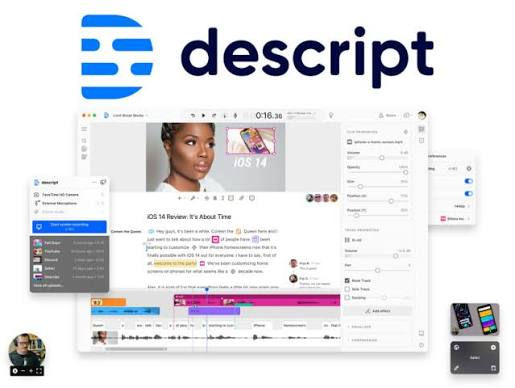
Descript is the more complete editor: a timeline alongside the script, multitrack sequences for several mics and camera angles, Studio Sound to clean up speech, and AI tools to remove retakes, regenerate speech and fix eye contact. Filler-word detection works in English only.
Riverside includes text-based editing on Pro and above, filler-word removal on every plan, and AI tools such as Magic Audio, Smart Mute, Magic Clips and auto-generated show notes.
Descript's script-based editor (image: Descript)
Edge: Descript, if your editor lives in the tool all day.
Transcription
Languages: Riverside's help center lists a much longer set of transcription languages, including Chinese, Arabic, Japanese and Russian. Descript supports around 25 languages, Latin-alphabet only, one language per file.
Speakers: Descript detects and labels speakers automatically, so it can separate two people sharing one file. Riverside labels speakers by their display name in the studio, one speaker per track.
Export: Descript exports transcripts as DOCX, TXT, RTF, Markdown or HTML, plus SRT and VTT subtitles. Riverside exports TXT and SRT.
Edge: Riverside for languages, Descript for speaker detection and export formats.
Client review and collaboration
This is where podcast agencies feel the difference most.
Descript includes comments on every plan, including Free. Comments are tied to words in the transcript, support @mentions and can be resolved. You can share a web link that lets anyone view and comment without a Descript account, and comments on a share page are pinned to the spot clicked in the audio or video. One catch: comments on the share page are kept separate from comments inside the project, and they're lost if you unpublish the page.
Riverside includes editor comments on every plan, with replies and resolve, shown as bubbles on the timeline. Its Share for review link lets anyone comment without an account, but it needs Pro or above. Reviewers see the video and transcript, not the timeline. Tagging teammates, review-link passwords and expiry, and collaborative editing are Business-only.
Neither tool documents an approval or sign-off step, or a way to compare feedback across versions of an edit.
Edge: Descript, because client comments are available on every plan.
Exporting to your DAW or video editor
Descript exports a timeline on Creator plans and above, for Premiere, DaVinci Resolve, Final Cut Pro, Reaper, Adobe Audition and Pro Tools/Logic (AAF). Unresolved comments can come along as timeline markers.
Riverside exports a timeline (XML for Premiere and Final Cut Pro, AAF, and a Pro Tools option) on the Business plan only. Its help center says Audition can't import the XML at this time. On any plan you can download each participant's track separately, within your plan's download hours.
Edge: Descript, by a wide margin for teams that finish in a DAW.
Pricing (October 2026)
Descript (per person, per month):
Free: $0, 60 media minutes a month
Hobbyist: $16 billed annually, $24 monthly
Creator: $24 billed annually, $35 monthly
Business: $50 billed annually, $65 monthly
Riverside (per month):
Free: $0, with a watermark and 2 hours of separate-track downloads
Pro: $24 billed annually, $29 monthly
Grow: $34 billed annually, $39 monthly
Webinar: $79 billed annually, $99 monthly
Business: custom pricing
Riverside's Pro, Grow and Webinar plans come with a 14-day free trial.
Which one should you choose?
Interview and panel shows, video-first podcasts, multilingual guests: Riverside.
Heavily edited narrative shows, solo editors, teams that finish in Audition, Pro Tools or Reaper: Descript.
Agencies with many clients: either can work, but check which review features sit on the plan you'd actually buy. Riverside's client review starts at Pro, and its team features at Business.
The step neither tool is built for: client feedback on the final mix
Descript and Riverside are where an episode gets recorded and cut. But many teams still send the final mix out by email or Drive link and collect notes like "the music is too loud around 12:40" in long threads.
Notetracks handles that review stage. Upload the episode, or several tracks that play back in sync, and share the project with hosts and clients. They leave timestamped comments right on the waveform or on the timestamped transcript, reply in threads, record voice notes, and mark notes resolved when they're fixed. Then export the comments as markers into Pro Tools, Adobe Audition, Audacity or Hindenburg, so every note lands on your timeline. Collaborators comment for free.
Reviewing an episode in Notetracks, with the timestamped transcript beside the waveform
Notetracks doesn't replace Descript or Riverside; it sits after them. Record in Riverside or Descript, edit where you like, and run the client review in Notetracks.


 Start Free