There's no single "best podcast software". There's a best tool for each job: recording guests, editing, cleaning up audio, getting feedback from hosts and clients, and publishing. This guide sorts the 13 tools podcast teams actually use by the job they do best, so you can build a stack instead of hunting for one app that does everything.
Every detail below comes from each company's own website, checked in October 2026. Prices and plans change often, so confirm on their sites before you buy.
Best pro audio editors: Adobe Audition, Pro Tools, REAPER
Best for spoken-word storytelling: Hindenburg PRO
Best free editors: Audacity, GarageBand
Best for audio cleanup and restoration: Auphonic, Adobe Podcast
Best all-in-one in the browser: Async (formerly Podcastle)
1. Notetracks: best for client review and feedback
Recording and editing tools are where an episode gets made. Notetracks is where it gets approved. Upload a mix, or several tracks that play back in sync like a session in your DAW, and share the project with hosts, producers and clients. They leave timestamped comments on a single moment or a whole range of the waveform, reply in threads, react with emoji, record voice notes and draw on the waveform, and you mark each note resolved when it's fixed.
A podcast rough cut in Notetracks: comment on a single moment or a whole range
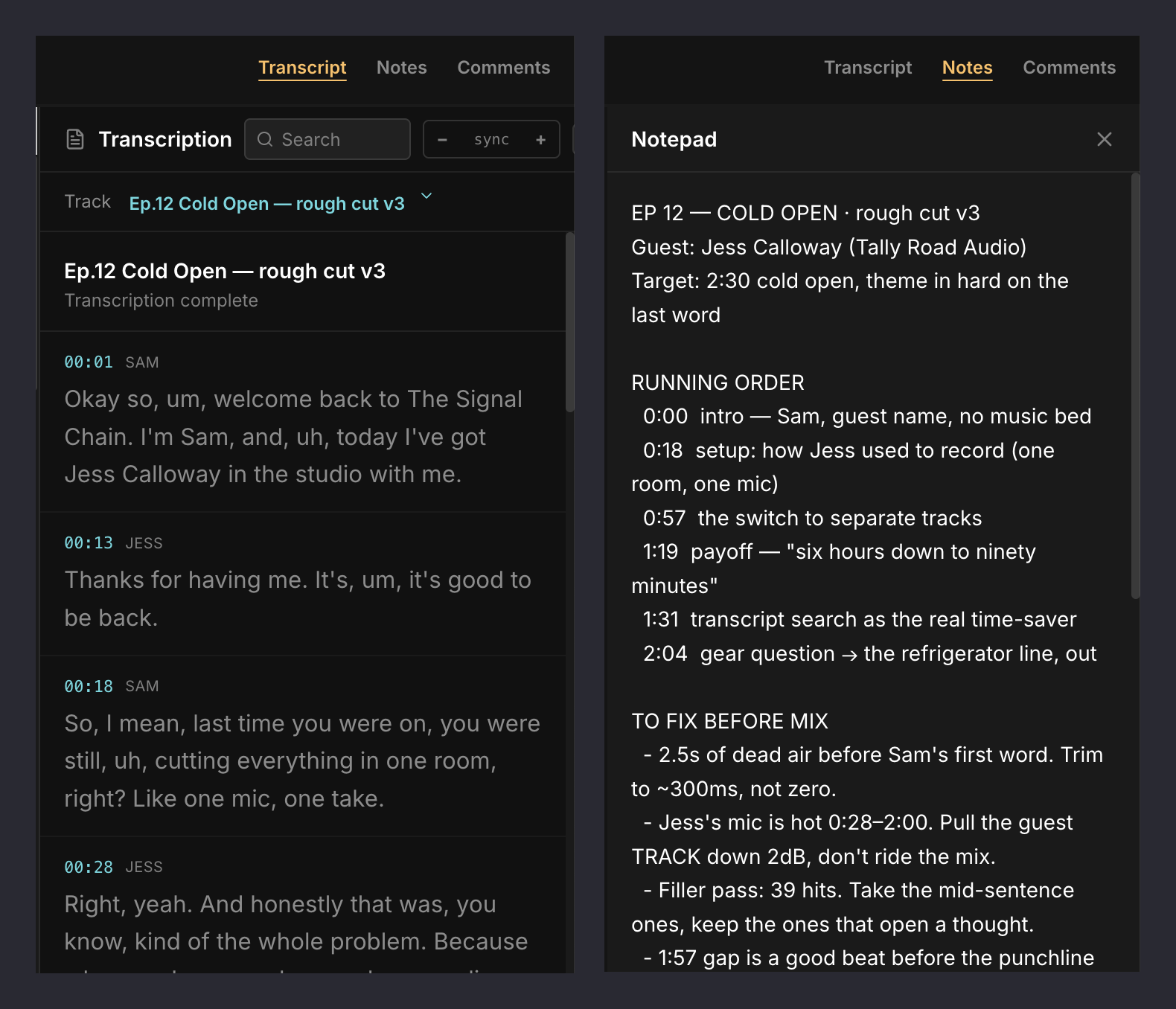
Timestamped transcripts: transcribe an episode with speaker labels, search it, click any line to jump to that moment, and let collaborators comment on the transcript itself.
A notepad in every project: keep the running order, the fix list and episode notes next to the audio they're about.
Notes back in your editor: export comments as markers into Pro Tools, Adobe Audition, Audacity or Hindenburg, so every note lands on your timeline.
A kanban board for every episode: switch your projects from a list to a board and move each episode from To Do to In Progress to Done, so you can see where the whole season stands at a glance.
Collaborators comment for free, and you can try any plan free for 7 days.
The timestamped transcript (left) and the project notepad (right)
The board view: every episode of the season, by status
Riverside is built around the recording session. Each participant is recorded locally on their own device, so a weak connection doesn't ruin their track.
Up to 100 participants per session, with up to 9 on screen.
Up to 4K video and 48 kHz audio on paid plans (720p and 44.1 kHz on Free).
Text-based editing on Pro and above, filler-word removal, Magic Audio enhancement and AI clips.
Transcription in a long list of languages, exported as TXT or SRT.
Price: free plan; Pro from $24/month billed annually ($29 monthly), with a 14-day trial.
Best for: interview and panel shows, especially video podcasts.
4. Zencastr: best free remote recorder
Zencastr's free plan covers remote recording, editing and hosting in one place.
Remote recording with local recording and cloud backup, 48 kHz WAV and up to 4K video, with unlimited separate tracks.
Text-based and multitrack editing, background-noise removal, level normalization and filler-word removal.
Unlimited transcription in 10 languages and unlimited audio and video hosting on the free plan.
Price: free plan; Enterprise pricing on request.
Best for: new shows that want remote recording and hosting without paying.
5. Adobe Audition: best pro editor for Creative Cloud users
Audition is Adobe's professional audio workstation, with separate waveform and multitrack editors.
A podcast template that sets up a multitrack recording session.
Noise reduction and the Essential Sound panel for dialogue clean-up.
macOS and Windows.
Price: from US$22.99/month on an annual plan, with a free trial.
Best for: editors already working in Adobe's apps. Notetracks comments import into Audition as markers.
6. Pro Tools: best for studios already on Pro Tools
Avid's Pro Tools is a multitrack DAW for recording, editing and mixing, and it now has a free tier.
Pro Tools Intro is free, with up to 8 audio tracks.
Artist ($9.99/month) raises that to 32 tracks; Studio and Ultimate go much further.
Includes the iZotope RX Spectral Editor to reduce noise and repair dialogue.
Best for: engineers who mix music and podcasts in the same studio. Notetracks comments import into Pro Tools as markers.
7. REAPER: best value pro editor
REAPER is a full multitrack recording, editing and mixing application with a one-time price.
Runs on Windows, macOS and Linux.
LUFS loudness normalization on export and a built-in loudness meter.
Price: 60-day free evaluation, then a one-time $60 license for personal use or small businesses ($225 commercial).
Best for: editors who want pro tools without a subscription.
8. Hindenburg PRO: best for spoken-word storytelling
Hindenburg PRO is built for journalists and audio storytellers rather than musicians.
Transcript-based editing, with built-in offline transcription in 99 languages and speaker detection (on Plus and Premium).
Auto Level using broadcast loudness standards, with podcast presets such as -16 LUFS.
Chapter timestamps and publishing to podcast hosts and FTP servers.
macOS and Windows, with a 30-day free trial.
Best for: narrative and documentary podcasts. Notetracks comments import into Hindenburg as markers.
9. Audacity: best free editor on any computer
Audacity is free and open source, and runs on Windows, macOS and Linux.
Multitrack recording and editing.
Noise reduction and a Loudness Normalization effect for hitting podcast platform targets.
Free local transcription through the OpenVINO plugin.
Best for: podcasters starting on a zero budget. Notetracks comments import into Audacity as labels.
10. GarageBand: best free option on Mac and iPad
GarageBand is Apple's free recording studio for Mac, with versions for iPad and iPhone.
Records to multiple audio tracks (up to 255).
Built for music first, with no podcast-specific tools, but fine for simple solo or in-person shows.
Best for: Mac users recording their first episodes.
11. Auphonic: best for audio restoration and loudness
Auphonic is an automated post-production service: upload your episode and it comes back cleaned up and at the right loudness.
AI noise and reverb reduction, breath and mouth-noise removal, and automatic cutting of silences, coughs and filler words.
An Adaptive Leveler that balances speakers and music, and loudness targets such as -16 LUFS for podcasts.
Multitrack processing with automatic ducking and mic-bleed removal.
Transcription, show notes and chapters on paid plans.
Price: 2 free hours a month; paid plans from €9/month.
Best for: fixing problem recordings and getting consistent loudness on every episode.
12. Adobe Podcast: best quick cleanup in the browser
Adobe Podcast is a set of browser tools, best known for Enhance Speech, which removes noise and echo from voice recordings.
Studio (beta) records remote guests on separate tracks and lets you edit by editing the transcript.
A free tier, with Premium included in Adobe's Firefly Pro plan.
Best for: rescuing a noisy recording in a few clicks.
13. Async (formerly Podcastle): best all-in-one in the browser
Podcastle rebranded as Async in early 2026. It combines remote recording, editing and hosting in the browser.
Remote multitrack recording, text-based editing, AI noise reduction and auto-leveling.
Transcription and AI clips, with an iOS app for some features.
A free plan with lifetime (not monthly) limits on recording and transcription hours.
Best for: solo creators who want everything in one browser tab.
Where podcast teams plan and publish
Recording and editing are only part of the job. Most teams also need somewhere to plan episodes and somewhere to publish them.
Planning: many podcast teams run their production calendar in ClickUp or Notion, and draft outlines, show notes and episode descriptions with AI assistants like Claude.
Publishing: Transistor.fm hosts unlimited shows on one account, with unlimited team members, private podcasts, analytics and a built-in podcast website. Plans start at $19/month, with a 14-day free trial.
How to choose
Solo and just starting: Audacity or GarageBand to edit, Zencastr to record guests, Auphonic to polish.
Interview shows with remote guests: Riverside or Zencastr to record, Descript or your DAW to edit.
Editors and agencies working for clients: record in Riverside or Descript, edit in Audition, Pro Tools, REAPER or Hindenburg, and run client review in Notetracks so every note comes back to your timeline as a marker.


 Book a DemoStart Free