Looking for Frame.io for audio?
Review audio, collect feedback and get revisions done faster.
Notetracks gives podcast producers, audio teams and their clients one place to review recordings, leave precise timestamped feedback and manage revisions. Share a link, collect notes directly on the waveform and bring them back into your DAW. No account required for reviewers.

Used by production teams including Lower Street and Radio New Zealand.


Audio feedback shouldn't live in five places
Most audio teams still review over email threads, Slack messages, Dropbox links and spreadsheets full of notes like “around 12:40, the second um”. Every round, someone has to match each note to the right file and the right second, and things still slip through.
Video review tools fix part of that, but they're built for picture. Audio teams need to see the waveform, hear stems together and get the notes back into Pro Tools or Audition, not Premiere.
Designed for audio, not adapted from video.
Frame.io is built around the picture: a frame-accurate video player, image markup and comment exports for video editors. Notetracks is built around the waveform, so every note sits on the sound it's about and lands back in your DAW.

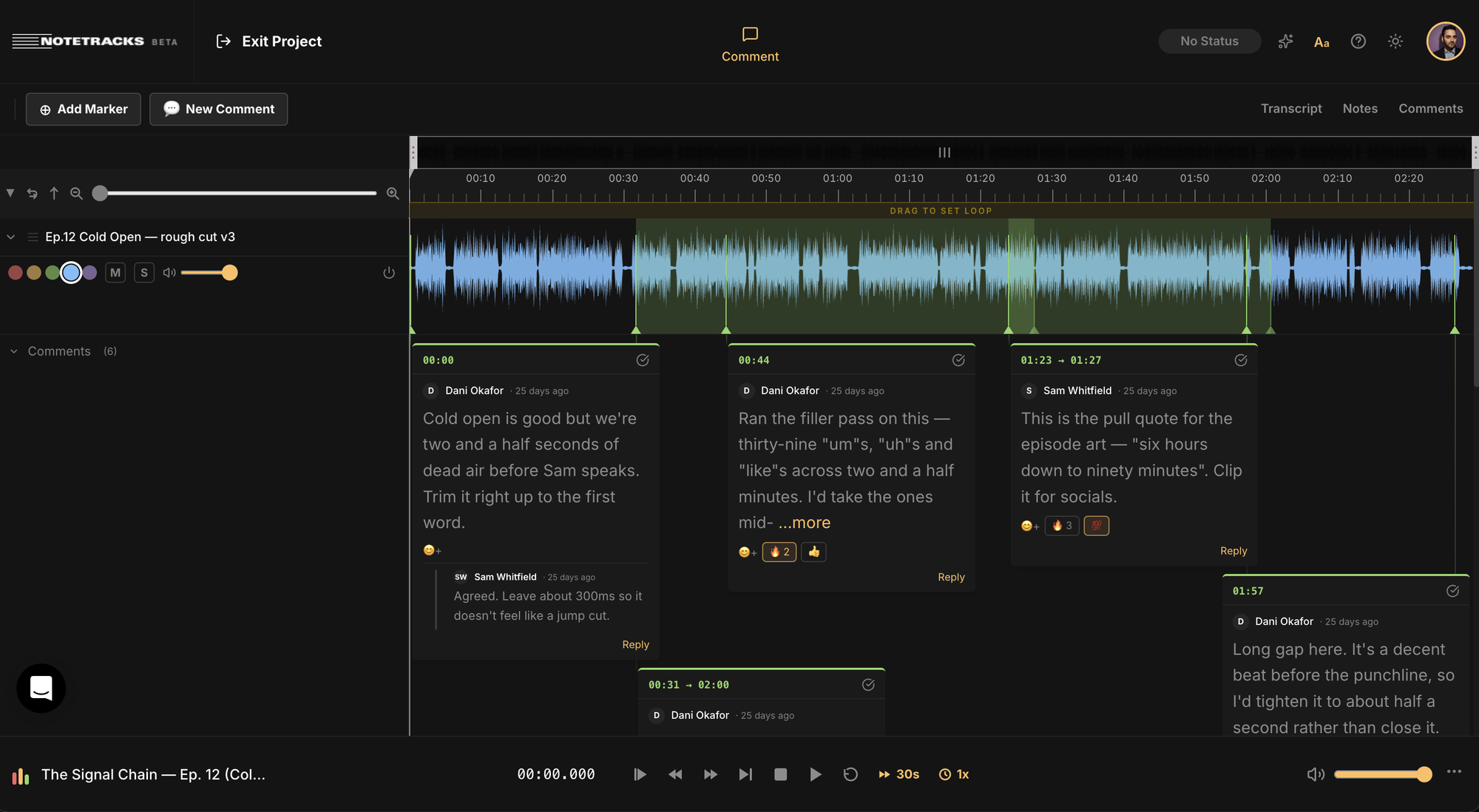
Timestamped feedback on a detailed waveform
Clients and teammates comment on a single moment or a whole range, in text or as a voice note, reply in threads and mark each note resolved when it's fixed.

Every revision in one project
Upload each new cut or mix to the same project and switch between versions, with the notes for each one kept together. Add stems or takes and they play back in sync.

Notes that land in your DAW
Export comments as markers into Pro Tools, Adobe Audition, Audacity or Hindenburg, so your editor sees every note right on the timeline.
How Notetracks works
Upload
Drag in your WAV or MP3 files, or import from Dropbox or Google Drive. Add stems, takes or several mixes to one project.
Share a review link
Send it by email, paste a public link into Slack, or share a link to one exact timestamp. Reviewers comment without creating an account.
Collect timestamped notes
Clients and teammates comment on a moment or a range of the waveform, reply in threads, record voice notes and draw on the waveform.
Revise and compare
Add the next version to the same project, switch between versions, mark notes resolved and export the rest as markers into your DAW.
Notetracks vs Frame.io for audio
Frame.io is a strong review tool for video teams. Here's how the two compare when the work is audio.
Frame.io details come from Frame.io's help center and pricing page, checked October 2026. Already reviewing picture in Frame.io? Keep it for video and run the sound review in Notetracks. Read the full Notetracks vs Frame.io comparison.
Want to see how Notetracks fits your audio workflow?
Book a 15-minute walkthrough. We'll show you how to manage reviews, revisions and approvals for your projects.
Book a Demo
“Notetracks Pro makes the process of communication with the clients, artists, a&rs that much more simple.”

“In our podcast collaboration with 3-4 people we started using Notetracks to have an ongoing dialogue on the actual audio track”
How production teams use it
Podcast client approvals
An agency sends each rough cut as a review link. The host flags a section to cut, the client leaves a voice note on the intro, and the editor imports every note into Pro Tools as markers. The next cut goes in the same project, so nobody digs through last week's emails.
See how Sydney Podcast Studios cut client review time by 50% →Daily meditation QA
A wellness app publishing new sessions every day needs a QA pass on each one: misreads, mouth clicks, music too loud under the voice. Reviewers mark each issue on the waveform, the editor fixes and resolves it, and the board shows which sessions are ready to ship.
See how Open reviews its meditation audio →Music and sync revisions
A composer uploads the cue and its stems. The music supervisor's note lands on the exact range (“hit harder from 0:42”), the stems play in sync so the mix engineer can hear what changed, and each revision sits in the same project as the last.
Notetracks for music production →Every show, session and mix on one board
See where every project stands. Move each episode, session or cue from To Do to In Progress to Done, keep the fix list in the project notepad, and search the timestamped transcript to find any line.

Frequently asked questions
How is Notetracks different from Frame.io?
Notetracks is designed for audio. You comment on a detailed waveform, play multiple audio tracks in sync in one project, and export comments as markers into Pro Tools, Adobe Audition, Audacity or Hindenburg. Frame.io is the better fit when most of your review is picture.
Do reviewers need an account?
No. Share a review link and clients can listen and leave comments without signing up, and collaborators never pay to comment.
Can I bring the comments into my DAW?
Yes. Export comments as markers into Pro Tools, Hindenburg, Adobe Audition or Audacity, so every note lands on your timeline.
Is Notetracks only for podcasts?
No. Teams use it for podcasts, music production, voice-over, audio drama and broadcast. It handles video files too, for teams that review both.
Is there a free trial?
Yes. Try any plan free for 7 days, or book a demo to see it with your own workflow.
Use Notetracks on all your audio projects

Get song feedback pinned to tracks section by section. Make tweaks so productions sound alive when they’re released.

Communicate ideas on drafts, save time on edits and deliver amazing episodes.

Analyze songs, submit assignments and gather peer and educator feedback.


