Every radio documentary goes through the same stretch. The tape is cut, the script is tracked, and the piece goes to your editor or commissioner. What comes back is a Google Doc of timecodes, a voice memo recorded in a car, or an email that says "at 12:04 the ambience drops out under the clip" and "the actuality at 3:40 needs to breathe before the track comes in." You find each moment by hand, fix it, bounce a new version, and do it again. The best radio documentary software is the one that makes three jobs easy: cutting tape fast, hitting broadcast loudness specs, and getting the piece signed off by your editor or commissioner.
No single app does all three well, and most working producers combine two or three tools. This guide compares the editors that radio producers, audio journalists and documentary podcast makers actually use, judged on those three jobs. Product details come from each company's own website, and the loudness figures come from the published standards themselves, all checked in November 2026. Prices change, so confirm them before you buy.
Best newsroom editor for spoken word: Hindenburg PRO
Best value one-time license: REAPER
Best for producers in the Adobe toolkit: Adobe Audition
Best free editor: Audacity (or ocenaudio)
Best for recording and cutting in the field on iPhone or iPad: Ferrite
What to look for in radio documentary software
Fast tape handling
A documentary is built from hours of raw tape: interviews, actuality (the sound of an event as it happened) and ambience (the room tone or atmosphere of a location). You want a clipboard or bin to store selects, multitrack editing so a clip can sit over ambience, and quick fades and crossfades. Transcription helps with logging, since you can search the tape for a line instead of scrubbing for it.
Loudness you can trust
Broadcasters reject or re-level programmes that miss their spec. Integrated loudness is the average loudness of the whole programme, measured in LUFS (loudness units relative to full scale; LKFS is the same unit under its US name). True peak, measured in dBTP, catches overs that happen between samples. Loudness range, measured in LU, describes how much the level moves between quiet and loud passages. Your software should measure all three and normalise to a target, not just to a peak.
Markers
Markers let you flag a bad edit, a pickup or an editor's note at an exact time, so nothing gets lost between versions. The best editors also import markers from a file, which matters as soon as someone else is writing the notes.
A way to get the cut signed off
Your editor, executive producer, commissioner, lawyer or contributor needs to hear the cut and leave notes at exact times, without installing your DAW. This is the job most audio software leaves out completely, and it is where most of the back-and-forth lives.
1. Notetracks: best for editorial sign-off and notes
Notetracks is not an editor. You don't record or cut tape in it. Every editor below is where the piece gets made. Notetracks is where other people's notes land, and where they leave as markers on your timeline.
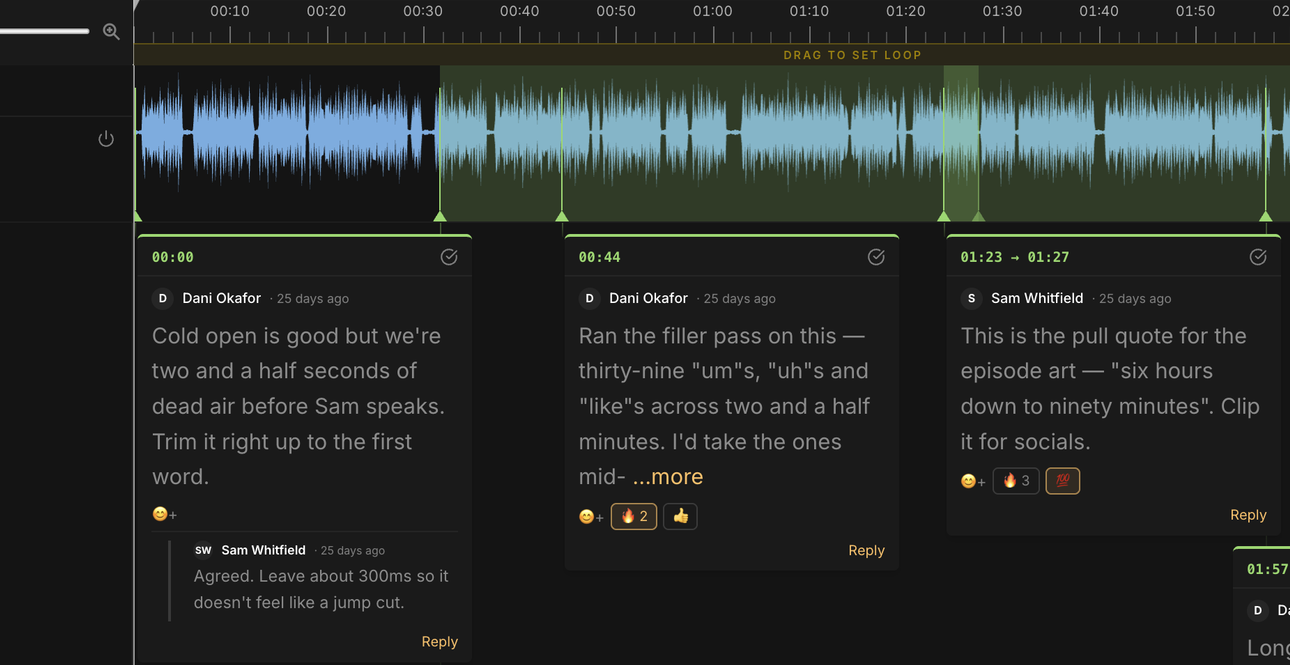
You upload the bounce and send a link. Your editor listens in the browser and clicks on the waveform to leave a note at that exact second, or drags across a range to flag a whole passage. When you export the notes and import them into your editor, each one becomes a marker at its time, with the note text and who wrote it.
Notes on a single moment or a whole range of the waveform, with replies in threads
Timestamped notes: comment on a single moment or a whole range, reply in threads, or, on the Team plan, record a voice note to show how a line should be read.
Every version in one project: upload each new cut to the same project, so the notes from every round stay together and the editor hears what changed.
Timestamped transcript: reviewers can follow the text and click any line to jump to that moment, which helps a lawyer or a contributor checking what was said.
Notes back in your editor: export the comments as markers into Hindenburg, REAPER, Pro Tools, Audition, Audacity or Premiere.
Control over files: share listen-only and turn downloads on when you're ready. Reviewers comment for free and don't need an account.
How do I get my editor's notes into Hindenburg? Share the cut from Notetracks, let your editor comment, then export the comments and import them into your Hindenburg session. Each note becomes a marker at its time, so you work down the list instead of hunting for timecodes from a document.
How is this different from Descript's comments? Descript also has timestamped comments, attached to words in the transcript. The difference is the job each tool wants. Descript wants to be your editor. Notetracks sits beside the editor you already use and hands the notes back to it.
2. Hindenburg PRO: best newsroom editor for spoken word
Hindenburg PRO is made for radio and podcast production. It assumes you are cutting voice, not music.
Clipboard: store selects from interviews, ambience and music in groups and favourites, then drag them into the edit.
Auto-level on import using EBU loudness standards, detecting speech and music.
Publish to several loudness targets at once, including -23 LUFS (EBU), -24 LUFS (PRSS) and podcast targets of -16, -18 and -14 LUFS.
Multitrack recording, call recording from Zoom and Google Meet, offline transcription in 99 languages and Manuscript, which lets you edit audio like a document.
Platform and price: macOS on Apple Silicon and Windows 11. Sold as Standard, Plus and Premium subscriptions (which differ mainly in transcription hours) or as a perpetual license. Check Hindenburg's site for current prices.
Best for: radio producers and audio journalists who want an editor designed around spoken-word storytelling and broadcast loudness. Notetracks comments import into Hindenburg as markers. Here's how markers work in Hindenburg and every other DAW.
3. REAPER: best value one-time license
REAPER is a full DAW with a small price and a huge amount of customisation.
Customisable toolbars, actions and themes, so you can set it up to cut speech fast.
A per-track LUFS meter, and a render dialog that normalises to integrated LUFS, true peak or peak with an optional brickwall limiter. It can also produce a loudness report at render.
Region/Marker Manager that imports and exports CSV.
Platform and price: Windows, macOS and Linux. 60-day full-featured evaluation, then $60 (individuals, small businesses, education and non-profits) or $225 (commercial), one time.
Audition is Adobe's audio editor, with both a waveform editor for single files and a multitrack view.
Match Loudness to ITU BS.1770, EBU R128 (-23 LUFS) or ATSC A/85 (-24 LUFS), with true-peak limits.
Spectral display, noise reduction and the Essential Sound panel for dialogue.
Markers that import from and export to CSV, and integration with Premiere Pro.
Platform and price: Windows and macOS. US$22.99/month on an annual plan, or as part of Creative Cloud.
Best for: producers who also cut video or already pay for Creative Cloud. Notetracks comments import into Audition as markers.
5. Pro Tools: the studio standard
Pro Tools is what most commercial studios run. If your documentary gets a final mix in a studio, it will probably happen here.
Memory Locations and marker rulers for navigating long sessions.
Import Session Data, which brings tracks and markers in from another session.
Non-destructive, clip-based multitrack editing.
Platform and price: Mac and Windows. Pro Tools Intro is free with up to 8 audio tracks. Artist, Studio and Ultimate are sold as subscriptions or perpetual licenses; check Avid's site for current prices.
Best for: producers who mix in or hand off to pro studios. Notetracks comments import into Pro Tools as markers. See how to add markers in Pro Tools.
6. Descript: best for editing from the transcript
Descript turns your tape into a transcript and lets you edit the audio by editing the text.
Text-based editing, with transcription built in.
Studio Sound and filler-word removal.
Comments attached to words in the transcript, with replies and @-mentions, and share links that let anyone listen in the browser.
Export with loudness normalisation to targets including -16, -18, -23 and -24 LUFS.
Platform and price: macOS, Windows and the web. A free plan, plus paid plans billed monthly or annually; check Descript's site for current prices.
Best for: reporters who think in transcripts and want to cut a first assembly fast. For more options, see our list of Descript alternatives.
7. Audacity: best free editor
Audacity is free and open source, and it's often the first editor a student or freelancer uses.
Loudness Normalization to a LUFS target, based on EBU R128, with -23 LUFS as the default.
Label tracks you can export to and import from text files.
Spectrogram view and plugin support.
Platform and price: Windows, macOS and Linux. Free.
TwistedWave is a lightweight editor that stays fast with multi-hour recordings, which makes it good for logging and trimming long interviews.
Markers while recording, and import and export of markers as CUE files or CSV.
Loudness normalisation to LUFS with a maximum-peak cap.
Batch processing, silence detection and speech recognition synced to a script.
Platform and price: Mac, Windows, iPhone, iPad and a browser version. On Mac and Windows, $9.99/month or $99.90 for the first year (less in later years), with a 30-day trial. The iOS app is $9.99.
Best for: reporters who need quick edits to long recordings.
9. Ferrite: best for field reporting on iOS
Ferrite Recording Studio is a multitrack editor for iPhone and iPad, built with journalists and podcasters in mind.
Bookmarks while recording, so you can flag a quote the moment you hear it.
Multitrack editing, Strip Silence, automatic ducking and auto-levelling.
Templates for recurring formats.
Platform and price: iPhone and iPad. Free to download, with Ferrite Pro as a $29.99 in-app purchase.
Best for: reporters who record, cut and file from the field without a laptop.
10. ocenaudio: the other free editor
ocenaudio is a free editor with a cleaner interface than Audacity.
A loudness and true-peak meter.
Spectrogram, VST plugins with real-time preview and multi-selection editing.
Markers and regions with a comments column, exportable as CSV.
Platform and price: Windows, macOS and Linux. Free.
Best for: anyone who wants free software that's easy to learn.
11. Fairlight in DaVinci Resolve: best when the documentary has pictures
Fairlight is the audio page inside DaVinci Resolve, so the sound edit sits on the same timeline as the picture.
Audio post tools including ADR, Foley and up to 2,000 real-time tracks.
Loudness meters in the monitoring panel, with a selectable metering standard.
A markers index for spotting lists.
Platform and price: Mac, Windows and Linux. The free version covers most work; DaVinci Resolve Studio is a one-time $295 and adds the AI Neural Engine features and text-based editing.
Best for: teams making a video documentary or a filmed version of a radio piece.
Cleanup companion: iZotope RX
iZotope RX isn't a DAW. It's the repair tool many radio producers run alongside one, especially for field tape.
De-click and De-hum in every edition.
Dialogue Isolate, Spectral Repair and Loudness Control in Standard and Advanced. Loudness Control includes EBU R128 and ATSC A/85 targets.
Platform and price: Mac and Windows. Elements $99, Standard $399, Advanced $1,399.
What loudness do I deliver a radio feature at? In Europe and for the BBC, -23 LUFS integrated with true peaks no higher than -1 dBTP. In the US, the ATSC and public-radio specs use -24 LUFS (or LKFS) with peaks no higher than -2 dBTP. Podcasts are delivered louder, around -16 to -18 LUFS. Your commissioning contract always wins, so check it first. These figures come from each standard or broadcaster's own published document:
EBU R 128 (2023), Europe: -23.0 LUFS integrated. Maximum true peak -1 dBTP. A tolerance of ±1.0 LU only where the target can't practically be met, such as live programmes; ±0.2 LU is allowed in quality control to cover measurement error. No maximum loudness range is set.
EBU R 128 s3, loudness in radio: -23.0 LUFS for production and programme exchange. Stations may distribute at -20.0 to -16.0 LUFS, but the programme you deliver stays at -23.
BBC radio, podcasts and audio (Audio Quality Information & Standards v1.7): -23 LUFS, ±0.2 LU for pre-recorded and ±1.0 LU for live. Maximum true peak -1 dBTP. Deliver a stereo, mono-compatible WAV (BWF), 48 kHz, 16-bit, as one interleaved file. Loudness range is for information only; the BBC gives typical values of 5 to 9 LU for long-form speech.
BBC podcasts (same document): -18 LUFS, maximum true peak -2 dBTP, maximum loudness range 13 LU.
ARD, ZDF and ORF, Germany and Austria (TPRF, November 2025): -23.0 LUFS, ±0.5 LU studio and ±1.0 LU live. Maximum true peak -1 dBTP. WAV, 48 kHz, 16-bit as standard.
ATSC A/85 (2026), US television: -24 LKFS, with true peak kept below -2 dBTP.
PRSS, US public radio satellite distribution (2014): -24 LUFS ±2 LU, true peak no higher than -2 dBTP.
RNZ Media File Format Standards (v1.0, 2019): -24 LKFS, maximum true peak -2. Maximum loudness range 10 LU for spoken features and 15 LU for music and drama. WAV, 48 kHz, 24-bit. RNZ now tells producers to check their contract or commissioner, so treat this as a starting point.
Australia: Free TV Australia's OP-59 sets -24 LKFS and -2 dBTP for television. We couldn't find a published ABC radio loudness figure, so ask your commissioning editor.
Apple Podcasts: -16 LKFS ±1 dB, with peaks no higher than -1 dBFS.
AES TD1008 (2021), streaming and podcasts: -18 LUFS for speech, measured on dialogue, with a maximum of -1 dBTP.
Integrated loudness and true peak are both defined in ITU-R BS.1770, now at version 5. Versions 3, 4 and 5 use the same algorithm, so any modern meter gives the same reading.
How editors give notes on a cut
How do editors give notes on a radio documentary cut? Usually in one of four ways, and each has a cost:
A Google Doc of timecodes. The most common. It works until the timecodes drift because you trimmed the top, or two people write notes against different versions.
A voice memo. Fast for the editor and full of nuance, but you have to listen to the whole memo, then find each moment it refers to.
An email. Easy to send and easy to lose in a thread, with no link to the audio at all.
A spotting session. Sitting together, in a room or on a call, and stopping on each problem. The clearest method and the most expensive in everyone's time, and hard to arrange across time zones.
All four leave you doing the same work: reading a time, finding it on your timeline, then fixing it. The alternative to timecoded notes in a Google Doc is to put the notes on the audio itself. In Notetracks, the editor clicks on the waveform where the problem is and types the note there, so it can't drift. When the review is done, the notes go into your editor as markers. Learn more about communicating notes to creative teams and adding markers to an audio file.
How to choose
Staff producer at a public broadcaster: Hindenburg PRO for the newsroom workflow and loudness targets, with iZotope RX for problem tape.
Freelancer on a budget: REAPER for a one-time $60, or Audacity or ocenaudio for free, plus the loudness checklist above.
Reporter working mostly in the field: Ferrite on an iPhone or iPad to record and cut, then finish at a desk in the editor of your choice.
Producer cutting for an editor, commissioner or executive producer: cut in any of the editors above and run the review in Notetracks, so every note comes back to your timeline as a marker.


 Book a DemoStart Free